
Profitability · Pro · Owner only
Build a business that can pay you.
Profitability is available on web for venue owners on Pro. The public calculator is a separate tool.
Results depend on recorded data and owner-entered assumptions. Planning estimate only. It is not financial, tax, accounting, or employment advice.
What the business needs to support
- Annual operating costs
- $60,000.00
- Annual owner-income goal
- $72,000.00
- Money to retain each year
- $12,000.00
Annual amount to cover costs and goals
$144,000.00
Services also need to cover their direct delivery and selling costs. These are example inputs, not recommended targets or customer results.
What is OpenChair Profitability?
Profitability is available on web for venue owners on Pro. The public calculator is a separate tool. The owner-only Pro workspace connects operating costs, owner-income goals, money retained in the business and sellable capacity. It previews service contribution and price review with recorded figures, estimates and missing costs shown separately.
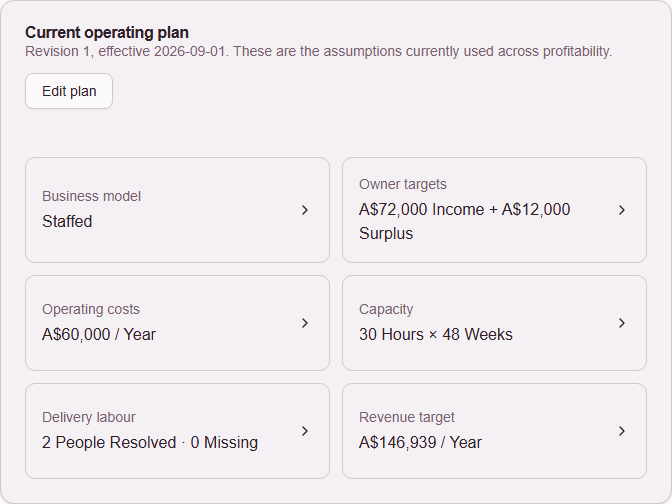
01 · Your operating plan
Include what you need to pay yourself.
Enter your running costs, your annual income goal and the money you want the business to retain. Add the weeks you expect to work and the service hours you expect to sell. These inputs form the basis of your operating plan.
You can inspect the assumptions behind the result and revise them as your business changes. An income goal is a planning input, not a prediction of what you will take home.
Your private income, cost and pricing assumptions stay in the owner-only Pro workspace.
Keep running costs separate from the direct costs of delivering a service. For example, avoid counting the same labour cost in both.
 Open full-size product screen
02 · Available time
Check the hours behind your plan.
The time your business is open and the time available to deliver services are different. Your plan needs to account for working weeks and realistic sellable hours.
Review the capacity assumption alongside your costs and goals. If you expect to sell fewer hours, the amount each occupied hour needs to contribute changes too.
Example: $144,000.00 a year to cover the costs and goals above, across 48 working weeks.
- 30 sellable hours / week
- $100.00
- needed per occupied hour, after direct service costs
- 24 sellable hours / week
- $125.00
- needed per occupied hour, after direct service costs
An assumption about sold service time, not a forecast of demand. Available hours and physical chair count do not establish how many hours clients will book.
03 · Service contribution
See what is left after the direct costs.
A service’s sales total does not tell you how much is left to support the business. OpenChair calculates contribution from net service revenue and its product, labour, commission and other direct variable costs when the required evidence is available.
That contribution helps cover running costs and the goals in your plan. It is not the business’s net profit.
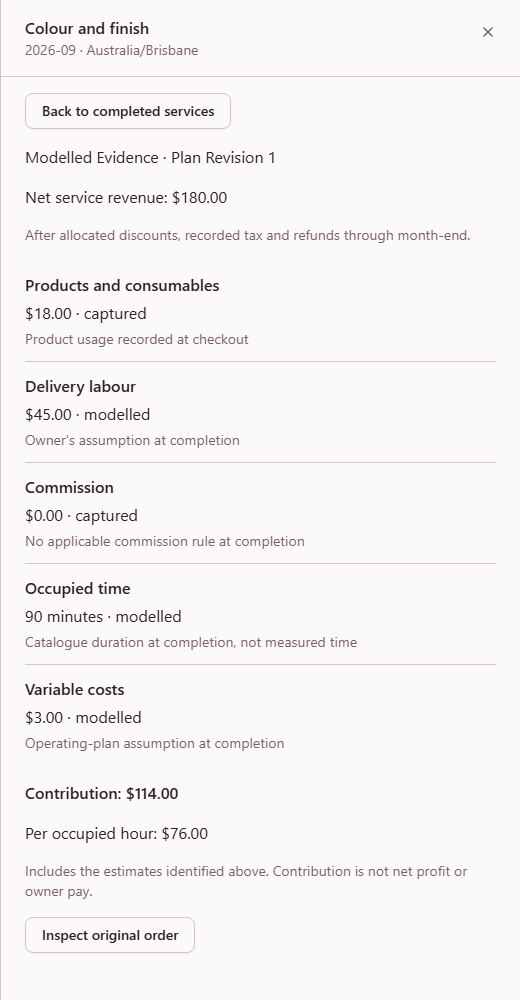
One completed service
Service contribution · AUD
- Net revenue, excluding tax and tips
- $180.00
- Product cost
- $18.00
- Delivery labour, modelled
- $45.00
- Commission, confirmed as none
- $0.00
- Processing and other direct variable costs
- $3.00
- Contribution
- $114.00
This service leaves $114.00 after the direct costs shown. Running costs and the owner’s income and retained-money goals still need to be covered.
04 · Complete the picture
Know which figures you can rely on.
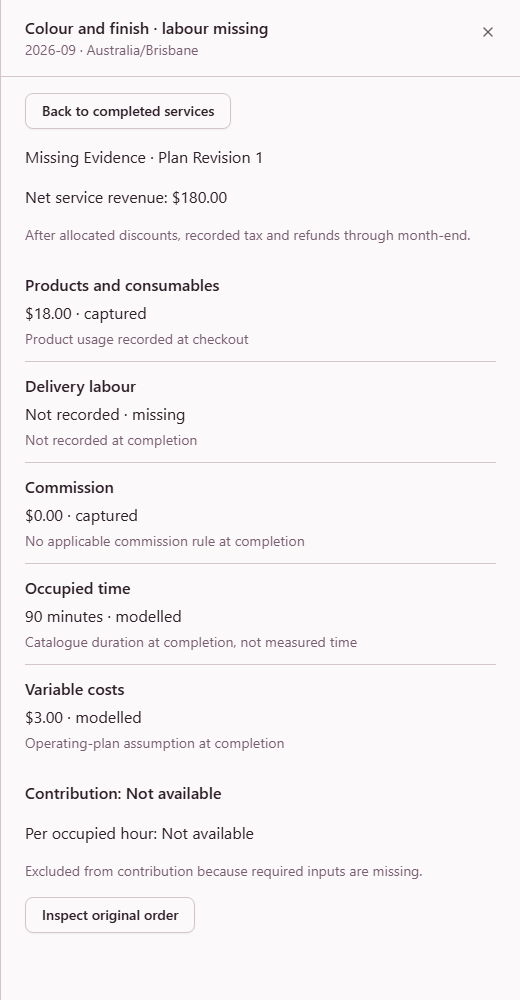
See which figures come from records, which depend on estimates and which are missing. If a required cost is unknown, OpenChair leaves the contribution unavailable instead of treating that cost as zero.
Supported estimates remain labelled as modelled. Updating today’s setup does not fill in missing historical records.
The example with all required costs
$114.00 contribution
Includes a $45.00 modelled labour cost. The result depends on that assumption.
The same service with labour cost missing
Contribution unavailable
Labour cost is missing. You can still inspect the other $21.00 in known costs, but the amount left after all direct costs is unknown.
See both completed-service records in OpenChair
 Open full-size product screen
 Open full-size product screen
05 · Price review
Review a proposed price before your menu changes.
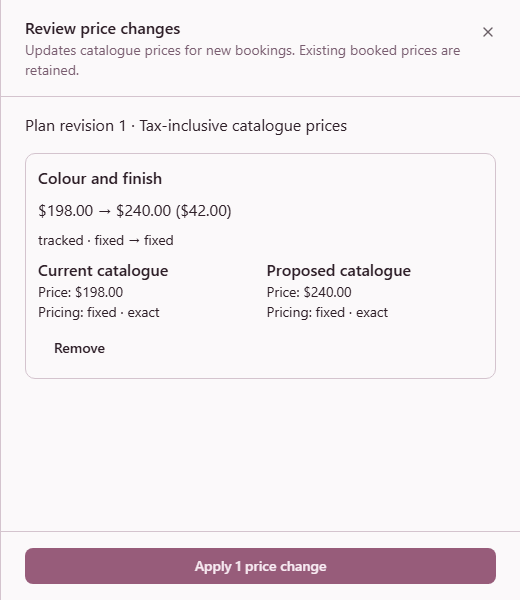
Use your operating plan and service-cost assumptions to calculate a target-price proposal. Review the current and proposed price, check the inputs and choose the changes you want to apply.
OpenChair does not change your menu until you review and apply a change. Price decreases and proposals with incomplete evidence are not preselected.
- 1Calculate the proposal from your plan.
- 2Inspect the assumptions and select changes.
- 3Review the exact changes before applying.
 Open full-size product screen
Using the 30-hour plan above for a 90-minute service. The planning assumptions below are separate from the completed-service record.
- Contribution needed for 90 minutes
- $150.00
- Product + delivery labour
- $18.00 + $45.00
- Expected discounts / commission
- 0% / 0%
- Assumed card mix / processing rate
- 100% / 2%
- Other variable costs
- 0%
- Tax / rounding
- 10% / up to the next $1
Example current price
$198.00
Target-price proposal
$240.00
Both prices include the example tax. The processing rate is an assumption, not an OpenChair fee offer. This is a planning requirement, not a recommended market price. No catalogue price changes here.
Before you start
Common questions
Can I use the owner Profitability workspace today?
Profitability is available on web for venue owners on Pro. The public calculator is a separate tool and can be used without an account.
Is this the same as my accounting profit?
No. The workspace uses planning calculations and supported service-contribution measures. Service contribution is what remains after its direct costs; it does not establish the business's net profit or replace your accounts.
Does OpenChair tell me the correct price to charge?
The workspace calculates a target-price proposal from your plan and service assumptions. You review the inputs and decide whether to apply a change. The result does not guarantee demand or profitability.
What happens when a cost is missing?
OpenChair marks required missing costs and leaves contribution unavailable where it cannot be calculated. Supported estimates remain labelled as modelled inputs.
Will OpenChair change my service prices automatically?
No. In the workspace, target prices are previews. The venue owner reviews the proposal and chooses what to apply. Decreases and proposals with incomplete evidence are not preselected.
Who can see my income and cost assumptions?
The Profitability workspace is restricted to the venue owner on Pro. Managers and staff cannot open it because it contains private income, cost and pricing assumptions.
Does the calculation use AI?
The workspace uses fixed calculations whose inputs and maths can be inspected. It does not provide AI financial advice.
Can I try the calculation without an OpenChair account?
Yes. The public service-pricing calculator shows a result from the figures you enter without requiring an OpenChair account. Emailing the result is optional, with a separate choice about marketing consent.
Put your own service through the maths.
Profitability is available on web for venue owners on Pro. The public calculator is a separate tool. It can be used without an account. Workspace access follows your venue's Pro entitlement and owner permissions.
Results depend on recorded data and owner-entered assumptions. Planning estimate only. It is not financial, tax, accounting, or employment advice.